
OMIOCNC USB Interface CNC Router Wiring Diagram and Precautions
0%
OMIOCNC USB Interface CNC Router Wiring Diagram and Precautions
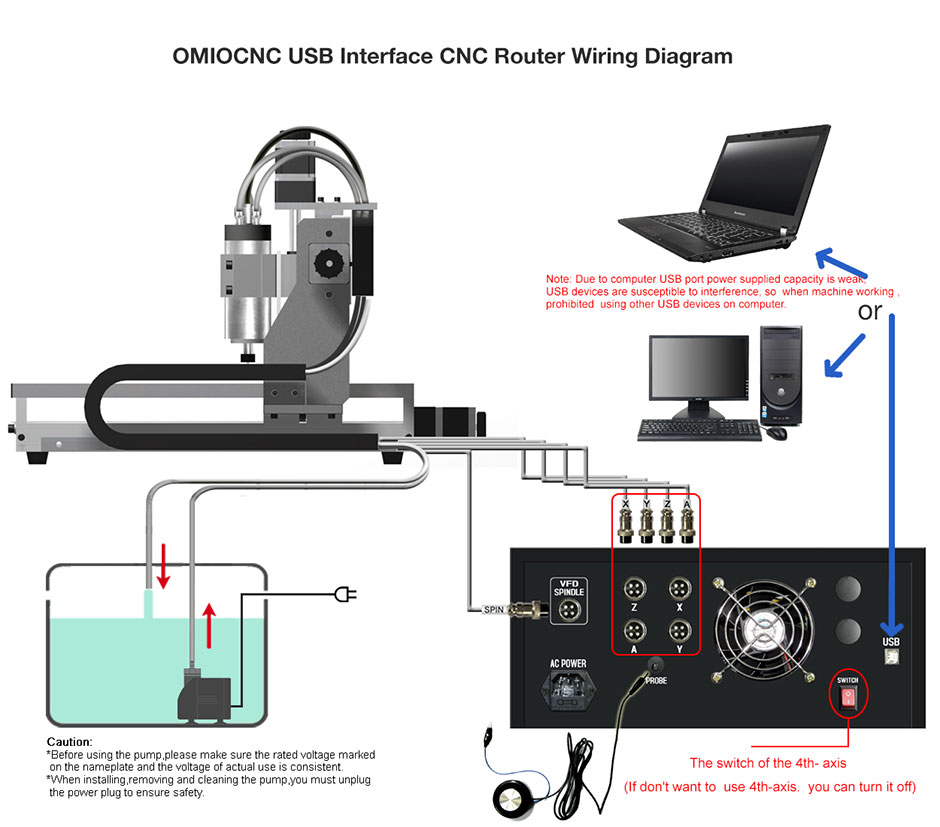
Connect your machine to the computer as shown in the diagram below. Please read all precautions carefully before operation.
Wiring Diagram Reference
Below is the reference diagram showing how to connect the control box to your computer.
Precautions
1. Rear Panel Port Layout May Vary
The arrangement of ports on the back of the control box may differ slightly depending on the model or version. Always identify each port before connecting cables.
2. USB Cable Connection to Computer
- For desktop PCs: Plug the USB cable directly into a USB port on the rear panel of the computer case (the motherboard USB ports). Never use front‑panel ports.
- For both laptops and desktops: Do not use USB extension cables or USB hubs (even powered ones). Doing so may result in unstable pulse signals, causing the machine to fail recognition by Mach3 or to operate erratically.
3. Computer Requirements
- Use a dedicated PC for the CNC router: Install only Mach3 software on this computer (important!). It is recommended to disconnect the computer from the network. Transfer G‑code files via a USB flash drive from other computers.
- PC only: Windows running on a Mac (whether natively installed or via a virtual machine) is not supported.
4. Table Requirements
The table or workbench must be sufficiently heavy, sturdy, and stable to support the CNC router during operation and minimize vibration.