
XYZ Axis
A:
Whether your machine is equipped with circular or square linear guides, they need to be regularly maintained.
After cleaning the linear guides, apply liquid bearing lubricating oil to the linear guides and perform reciprocating motion to achieve lubrication. There is no need to remove the bearings.
After each use of the machine, use compressed air to blow off the dust generated by machine cutting. According to the frequency of use, lubricating oil (regular "transparent liquid viscosity free" lubricating oil) can be used every 2 weeks or once a month for linear guides and screw rods.
A:
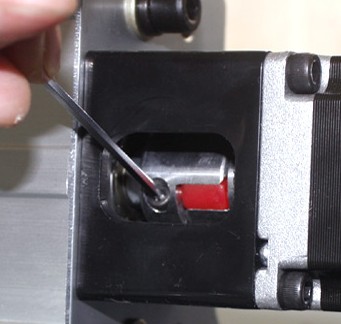
Please check the coupling of the X/Y/Z-axis stepper motor, it’s in the motor base, see the below picture(The coupling appearance of each model and motor base may be different.).
The couplings of the XYZ axis must be tightened.
A:
Please follow below steps to check the machine:
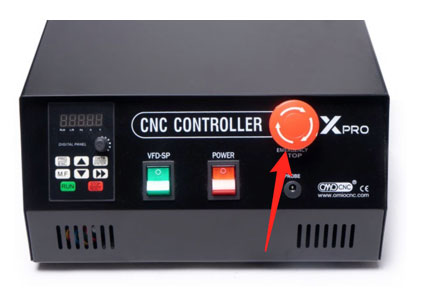
Step 1. Look at the control box, check the red big Emergency Stop Knob if it is pressed. If it is pressed the machine will always be powered off, Rotate it to release.
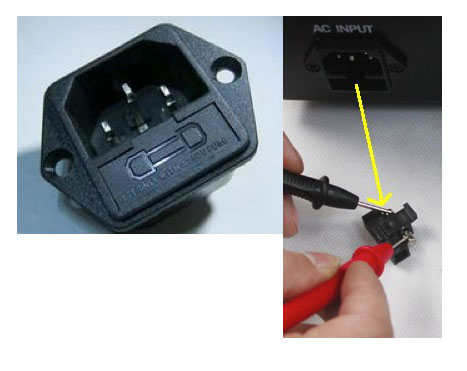
Step 2. Look at backend of the control box, see attached pictures, check the fuse if it is burnt. If it is burnt, replace it . There is a spare fuse in the accessories box (the small plastic box)
If there are no problems in the above two steps, then follow the Step 3 to check.
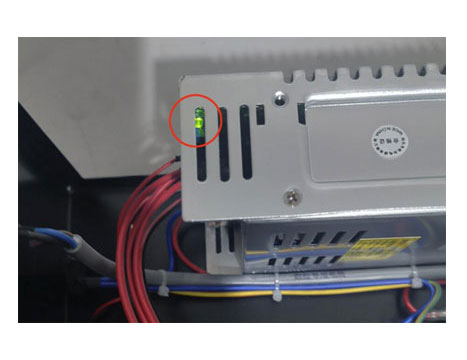
Step 3. Open the control box, turn on the POWER switch, check if the LED in the Switching Power Module is on.
A:
We have watched your video and your machine has been in use for over 5 years. The Y-axis screw is severely worn and requires replacement of the Y-axis screw unit, including the nut bearings on the screw. If you need to purchase a new screw unit, please contact us.
A:
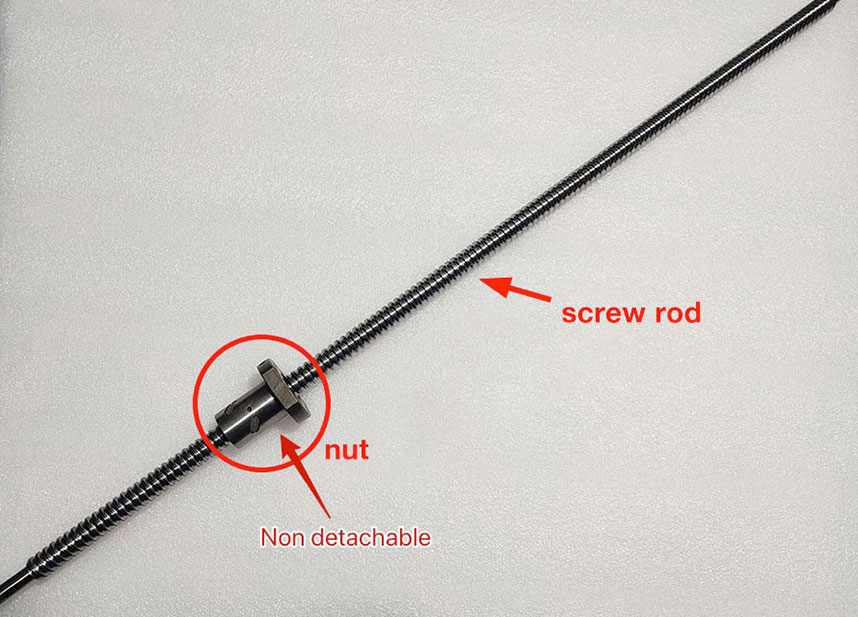
Please refer to the attached image. The screw unit includes the screw itself and the sliding bearing nut. The bearing nut cannot be disassembled, otherwise it will not be able to be reinstalled. The screw unit needs to be replaced as a whole. When we sell screw rods to users, we sell the entire screw unit, including the screw rod and the bearing nut .
A:
Look at the back of the control box.
Insert the "X-axis stepper motor cable" into the "Y-axis port”.
Then use Y+ Y- to test the X axis. (In this way, it can be judged whether the X-axis Cable and Stepper Motor are faulty).
Then Insert the Y-axis cable into the "X-axis port”.
Use X+ X- to test the Y-axis . (In this way, it can be judged whether the X-axis Stepper Drive board is faulty).
A:
The limit function does not work for three reasons:
1. The cable is not plugged in or not plugged in properly.
Check your cable of the switches.
2. The user's operation sequence is wrong, the limit switch is not activated.
Activate the limit switch:
turn on machine, first click the "REF ALL HOME" to back to a mechanical origin, and then click "SOFT LIMITS" to activate limit.
3. The user did not copy the configuration file we sent, or the user changed the settings in Mach3.
2) Go to the Mach3 —>Input Signals , take a screenshot to us.
3) Go to the Mach3 —>Config—>Homing/Limits , take a screenshot to us.