Others
A:
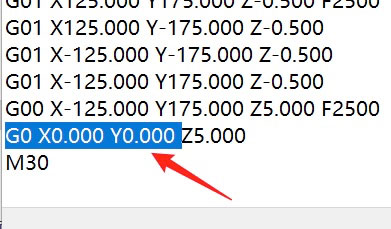
Add a line of code at the end of your Toolpath G-code: G0 X0.000 Y0.000
or see following picture.
A:
The anti-interference problem of USB is an industry problem, and there is no better solution by itself, usually to improve the external environment.
In the factory, it is mainly to add a large filter to the power supply of the machine to purify the power interference.
A:
DC48v,80ⅹ80cm, buy new one to replace it . No need to consider air flow capacity.
A:
Please see here first:
◆ The frequently used CAM software in engraving machine areas: ArtCAM, AlphaCAM, Aspire, Artcut, Cut2D / 3D, CopperCAM, DeskProto, Type3, UcanCAM, these software can be directly export G-code file. we recommend using these software, the details please consult the software provider.
◆ Other industrial CAM software (such as MasterCAM, PowerMill, HyperMill, Pro/E, UG, Lemoine RTM, etc.) may be required post-processing program, please consult the software provider for mach3 post processor.
◆ SolidWorks, AutoCAD, CorelDRAW software can not directly generate G-code files , but they can exporte '.stl', '.eps', '.dxf' file, these format files can be imported to ArtCAM, Cut2D/3D, DeskProto, Artcut software, then export G-code files.
For VCarve/Aspire/Cut2D/3D, export file to “ G-code(mm)(*.tap) “
For Fusion360, select Mach3 post processor for 3 axis work.
Finally, all of our machines support G-code tool path files in Mach3 format. Please choose a CAM software that can export files that support Mach3.
A:
Simple method:
Prepare a thick copper wire , one end attached to the foot of the machine working table or any screw of the working table, and the other end connected to the Metal water pipes at home, or nailed a large nail into the ground then connect it to the copper Wire.
A:
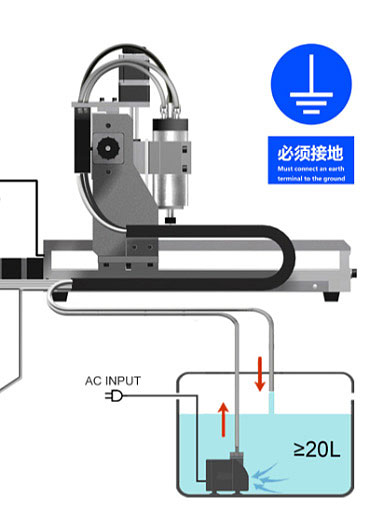
• The volume of the cooling water tank should be greater than 20L.
• You can use a plastic container(barrels) with a lid. Prevent dust falling into the water.
• The cooling water temperature should be controlled below 35 degrees Celsius. Use a large capacity water tank can effectively reduce the water temperature.
• You can use purified water or tap water as cooling water.
• You can add 1% ~ 3% liquid rust to the cooling water (liquid rust for automobile water tank can be used).
• The water pump must be completely submerged in the water.
A:
it has little practicability. It is usually used for large or super large woodworking machine. So we do not provide parts to connect to the vacuum cleaner, the reasons:
1. Ordinary household vacuum cleaners have insufficient suction power. You can only use high-power woodworking vacuum cleaners, and can only suck lighter wood chips, not metal chips.
2. In actual work, when the woodworking vacuum cleaner continues to work, the noise is very loud and unbearable. Unless you have a separate workshop, otherwise, the noise of the vacuum cleaner will definitely affect your neighbors.
Our suggestion:
Use acrylic or other transparent materials to make a large shell for your machine to prevent debris from splashing. After the processing is completed, use a high-power vacuum cleaner to clean up the dusts.
A:
The spindle is a consumable, and its service life is usually one year, or a maximum of around 2000 hours, depending on the different materials and processing intensities processed.
The biggest possible cause of the spindle not rotating is excessive cutting resistance, which leads to the spindle being blocked and damaged. This is related to the user's processing experience, and it is not necessarily due to the expiration of the spindle's lifespan and natural damage.
Machines over 5 years old, even if the spindle is not damaged, still need to be replaced with a new spindle due to accuracy reasons.
A:
1, When preparing not to use the machine for a long time, please use compressed air to dry the water in the spindle.
2, If the circulating cooling water is difficult to pass through the spindle, go to your local professional sales (maintenance) industrial equipment store to see if there is a "spindle dredging fluid" available for sale.
Since it is liquid, we cannot ship it abroad by international express.
A:
1, Keep clean
After each use of the machine, be sure to clean the dust on the platform and drive unit. Use compressed air to blow dust out of the control box (Do not use brushes or any other tools which could produce electrostatic electricity), check the screws of the wire plugs to ensure an optimal contact.
2. Lubrication weekly
Lubricate the rails and ball screws weekly with special grease for rails. If you do not have access to it in you local market, you can use high-speed bearing grease (lithium grease, white, suitable temperature: -20 °C ~ 120 °C).
3. Idling
If you plan on not using the machine for a long time, ensure to take dust and water proof precautions. Make the machine idle for at least half an hour per week to ensure the flexibility of the transmission system.
4. Flat & stable desk
The engraving machine must be placed on a solid and heavy desk, the desktop must be flat. we suggest placing a steel plate on the desk, uneven desktop will cause deformation of the machines underpan.
5. Loose trailing cables
Check the cable line of the drag chain at least one time per month, and loosen the tight cable line in time, so as to ensure that each line in the drag chain is loose. At the time of engraving, these cable lines need to do flexing operations repeatedly, so if the line is tight, it may easily lead to breaking of internal copper wires, thus causing poor contact. This may cause the electric motor to run out of control.
A:
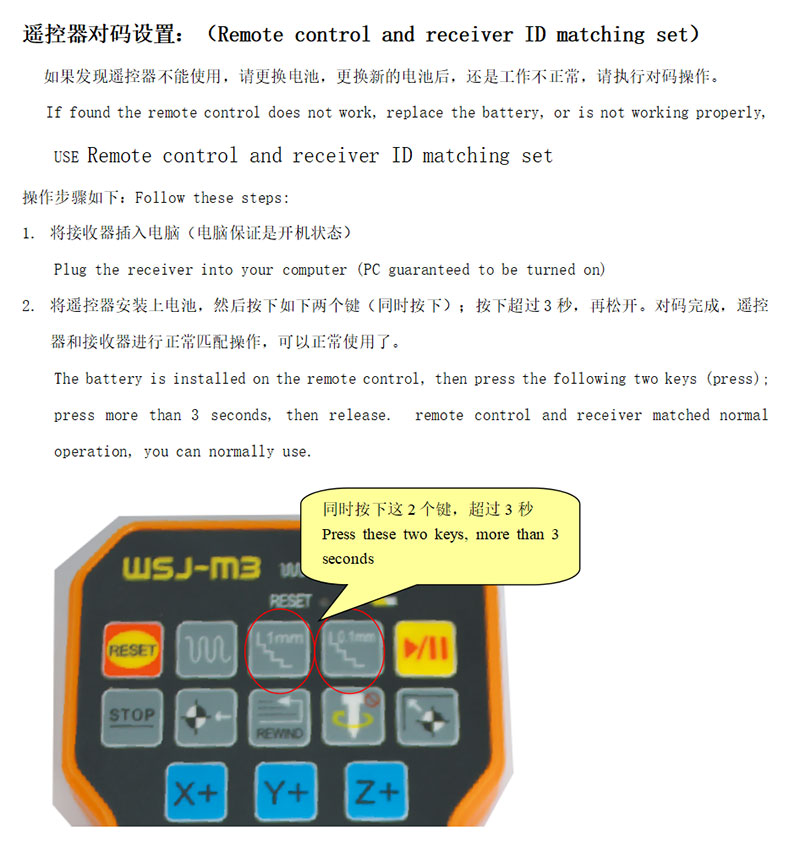
Please see the following picture. Turn on the machine and run the Mach3 software first, then follow the steps to set the remote matching.