
Dear Customer, Chinese New Year festival is coming soon, we will leave on January 29 ~ February 18. In the meantime we will stop shipping.
During our holiday, you still can buy machine from our website, we will shipping all the order on February 19~20.
welcome to omiocnc.com
Blog
Blog
Holiday Notice
1/22/2016 2:51 PM
Comments |
Posted in Announcement
By lance chen
Important for LCM2019 laser machine
11/17/2015 2:47 PM
Please attention (important!) :
Prohibit to plug or unplug the USB cable in an energized state! Otherwise it'll cause to burn electronic components.
Correct steps:
Step 1, plug the USB cable;
Step 2, open the software (to establish communication connection);
Step 3, turn on the laser power;
Step 4, start working.
Step 5, after working, turn off the laser power first, then quit the software;
If you want to unplug the USB, you must turn off the power and quit the software.
Comments |
Posted in Product News
By lance chen
European buyers please note
11/5/2015 1:47 PM
European buyers please note below informations:
For Italian buyer:
Italian buyer needs to provide VAT/Tax number to us.
For German buyer:
if Shipping address include company name, buyer needs to provide VAT/Tax number to us.
For UK buyer and Norway buyer:
if choose shipping by Fedex,we must to declare full value when shipping.
Comments |
Posted in Announcement
By lance chen
Bank Transfer
10/13/2015 12:29 PM
Our company has been registered in Hong Kong. Welcome to use bank transfer as payment method, please remit to our HongKong company's bank account.
Our HongKong company name: OMIOCNC HONG KONG TRADING LIMITED
Read More
Our HongKong company name: OMIOCNC HONG KONG TRADING LIMITED
Bank Transfer.
Steps:
1) When you planing an order and checkout, select "Bank Transfer" as payment method.
2) When you transfer money, please remark your order number .
3) After paid, please send a copy of Bank Slip (Receipt) to: [email protected].
4) After we receive the payment, we'll let you know, and ship your order on next working day.
note: It'll takes about 1-5 business days to arrive our Bank account.
Our bank account details:
| Recipient (Beneficiary): | OMIOCNC HONG KONG TRADING LIMITED |
| Recipient Account Number: | 801484411838 |
| Bank Name: | The Hongkong and Shanghai Banking Corporation Limited |
| Bank Swift Code: | HSBCHKHHHKH |
| Bank Address: | Head Office 1 Queen's Road Central Hong Kong |
Why Bank Transfer?
If you pay via bank transfer, You'll get 4% discount, this discount can be seen when you placing an order and choose payment method.
Comments |
Posted in Announcement
By Robert
Stop Shipment from Sep 28 to Oct 06.
9/28/2015 5:37 PM
Due to the National Day holiday, we will stop shipment from September 28th to Oct.6th. From September 28th to Oct.6th, you could still place your order on our website.
Shipment will resume on Oct.7th, 2015.
Comments |
Posted in Announcement
By lance chen
About Spindle Motor Speed
9/22/2015 9:04 PM
1. For plastic materials such as ABS/PVC/POM/nylon, use a speed of approximately 18,000 RPM.
2. For 6061 aluminum and H59 brass, the speed is approximately 20,000 RPM.
2. For acrylic, the speed ranges from about 18,000 to 22,000 RPM.
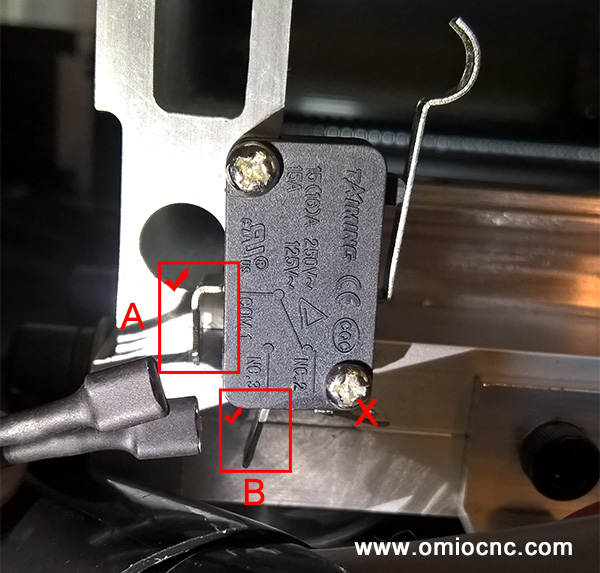
How to connect X6-2200L limit switch?
9/15/2015 12:16 PM
How to connect X6-2200L limit switch?
see below picture, plug the two wires arbitrarily to A&B pins of switch .
New Products -----LCM2019 Laser Carving Machine
9/9/2015 7:14 PM
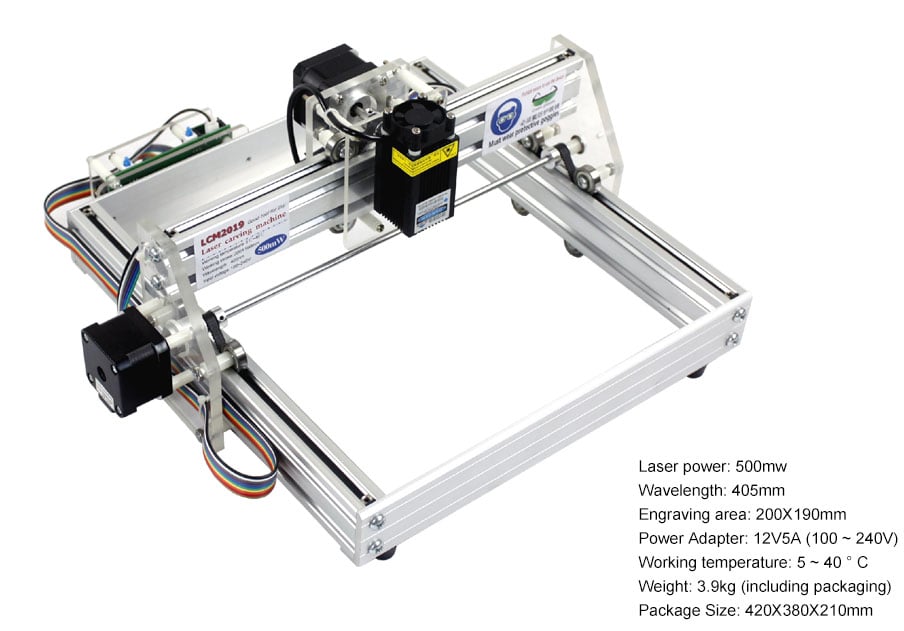
LCM2019 laser engraving machine comes from “open source laser engraving machine” project. As it uses a comparative small power 500mw laser, its market position is a DIY gadget, It is not applicable to batches of cutting materials or production.
Applicable materials for engraving : wood, some plastics, paper, ox horn, leather, pearl wool and so on.
Applicable materials for cutting : paper, slim wood sheet, sticky note and pearl wool.
Inapplicable materials: metal, stone, ceremics, jewellery and jade,reflecting materials , transparent and semi-transparent materials.
Comments |
Posted in Product News
By Robert


Customer Services
Payment and Shipping
Company Policies
Business Cooperation